

The Tech Integration: Smart QR Code Door Signs for Hybrid Offices
APRIL 16, 2026| Max TabaeianCategories
Door SignsSan Diego’s tech office landscape has changed permanently. Hybrid work schedules mean that on any given day, a third of the desks might be empty, two conference rooms are booked back-to-back, and a visitor walking in from the lobby has no idea where to go.
The signage that worked for a traditional 9-to-5 office does not work for this environment. Static door signs that say “Conference Room B” tell you nothing about whether the room is available, who booked it, or how to check in without interrupting someone.
The solution that forward-thinking San Diego companies are implementing combines something physical with something digital: a professionally printed door sign with an embedded QR code that connects to live scheduling, check-in, and wayfinding systems. It sounds complex. The execution is simpler than most office managers expect, and the result is a workspace that feels as smart as the people working in it.
What Are QR Code Door Signs?
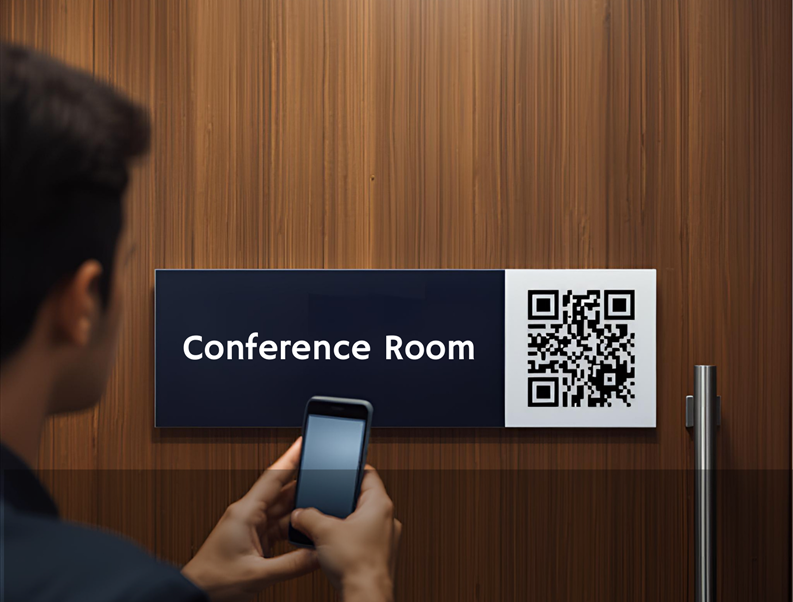
QR code door signs are physical office signage panels with embedded scannable codes that link to room booking systems, digital check-in tools, or internal directories, enabling real-time interaction through a smartphone. They are typically mounted beside a conference room, private office, or shared workspace entry.
When a visitor or employee scans the code with a smartphone, they can access a room booking calendar, complete a digital check-in, retrieve meeting information, or navigate to the correct person or department within the building.
The physical sign itself is a standard large-format printed panel, most commonly produced in acrylic, aluminum composite, or brushed metal, with the QR code printed or embedded directly into the design. The code links to any URL the organization designates: a booking platform like Google Workspace, Microsoft 365, Calendly, or a custom room management system.
The sign is static; the destination it points to is dynamic. That combination gives organizations a future-proof, low-maintenance way to add digital intelligence to their physical spaces without replacing their existing scheduling infrastructure.
Why Hybrid Offices Need Smarter Door Signs?
Traditional door signs were designed for a simpler workplace. When the same people sat at the same desks five days a week, and conference rooms were reserved by walking up and checking a whiteboard, a laminated nameplate was sufficient. Hybrid work has changed four things that make traditional door signs inadequate.
First, space utilization is unpredictable. Rooms are sometimes booked and empty, sometimes occupied without a booking, and often their status is unknown to anyone approaching from the corridor.
Second, visitor check-in is more frequent. Hybrid offices often have a rotating cast of external collaborators, contractors, and clients who do not know the building layout and cannot ask a receptionist because there is no one at reception.
Third, employee density varies by day, so wayfinding matters more. Finding a specific person, team, or room requires active navigation rather than memory.
Fourth, San Diego’s tech startup culture expects a frictionless, app-consistent experience. A hand-written room status sign is a brand inconsistency that communicates the wrong message to a tech-forward client. QR code door signs address all four of these shifts in a single, elegantly designed panel.
How QR Code Integration Works in Practice?
The technical setup is straightforward for any organization already using cloud-based scheduling. The QR code on the door sign is generated once and linked to the room’s booking URL or check-in page within the existing platform. It does not require new software, a subscription to a separate system, or ongoing management of the sign itself.
Here is how a typical interaction works in a hybrid San Diego tech office. An employee approaches a conference room before a meeting. They scan the QR code beside the door. Their phone opens the room’s booking calendar, confirms the next two bookings, and shows the current occupancy status. A visitor arriving for a 2 pm meeting scans the lobby directory QR and receives turn-by-turn directions to the correct room. A facilities manager scanning a supply room QR code accesses the maintenance log and submits a request without returning to a computer.
The sign does not change. The intelligence behind it updates in real time through the organization’s existing systems. This is what makes QR code door signs a practical solution rather than a speculative one: the digital layer is already there in most San Diego offices. The physical sign is the access point.
Design Standards That Make QR Codes Work
Not all QR code door signs are created equal. The physical quality of the sign determines whether the QR code scans reliably, whether it reads as professional or afterthought, and whether it holds up in a high-traffic office environment over years of daily use.
Four design standards matter most for QR code integration in office signage.
Print resolution and contrast
A QR code must be printed at a minimum 300 DPI with high contrast between the code and its background. Low-resolution printing, gradients behind the code, or insufficient quiet zone margins around the code will reduce scan reliability. Our large-format printing process produces QR codes that scan on the first attempt from any standard smartphone camera at a comfortable reading distance.
Material specification
For long-term durability in an office environment, acrylic panels and aluminum composite are the preferred substrates. Both hold color accurately, resist fading under office lighting, and can be produced with a matte finish that eliminates glare interference when scanning. Our acrylic signs are a popular choice for tech offices specifically because they communicate a premium finish that aligns with the brand.
Panel sizing for door mount placement
The standard office door sign format positions the QR code within a panel that includes the room name, number, and any occupancy indicator. Panel dimensions of 4×8 inches to 6×10 inches provide enough space for clear QR code sizing, readable room information, and your logo or brand mark without overcrowding the design.
Brand integration
A QR code panel that does not match the organization’s brand language looks like a workaround rather than a feature. We design QR code door signs to the same brand standards as every other sign in the office, ensuring that the technology feels like a deliberate design decision rather than a retrofit.
QR Code Door Signs as Part of a Complete Office Wayfinding System
QR code door signs deliver their greatest value as part of a cohesive office wayfinding system rather than as standalone installations. In a fully integrated hybrid office, QR codes appear at the lobby entry linked to a building directory, at corridor intersections linked to floor maps, at individual room doors linked to booking systems, and at workstation clusters linked to employee directories.
This layered approach means that any visitor or employee can navigate the entire office using only the physical signs and their smartphone, without asking for directions or logging into a building management app. We design and install complete directional signage systems for San Diego offices that integrate QR functionality across every touchpoint in the visitor and employee journey.
A well-designed lobby sign with a directory QR is particularly high-impact because it replaces the receptionist function for navigation without replacing the human experience of a staffed front desk. Our lobby and reception signs for San Diego tech startups frequently incorporate QR directory access as a standard feature of the entry experience.
How SpeedPro of Greater San Diego Produces QR Code Door Signs
We produce QR code door signs for hybrid offices, tech startups, commercial buildings, and co-working spaces across San Diego from our studio at 8515 Arjons Dr, Suite A. These include tech-focused areas such as Sorrento Valley, La Jolla, and Downtown, where hybrid work environments are standard. Every project begins with a design consultation where we review the office layout, the digital platforms already in use, the brand standards for the sign system, and the number and type of doors and spaces to be signed.
From there, we produce a complete sign package that can include door signs with embedded QR codes, lobby directories, corridor directionals, and any wall graphics or murals that complete the branded environment. Every sign is produced to commercial-grade specifications, professionally installed, and designed to work as part of a coherent visual system rather than a collection of individual panels.
San Diego’s hybrid office market is moving fast. The organizations investing in smart signage now are building offices that communicate quality, competence, and forward thinking to every employee and visitor who walks through the door.
Ready to design smart QR code door signs for your San Diego office? Request a quote from SpeedPro of Greater San Diego today. Get QR code door signs tailored to your office layout, scheduling platform, and wayfinding needs.
Frequently Asked Questions
QR code door signs are professionally printed signage panels mounted beside office doors, conference rooms, or shared spaces that incorporate a scannable QR code linked to a digital system. When scanned with a smartphone, the code can open a room booking calendar, a digital check-in page, a building directory, or any URL the organization designates. The physical sign is static and durable; the digital destination updates in real time through the organization’s existing scheduling or management platform. They are a practical solution for hybrid offices, managing variable space utilization and contactless visitor check-in.
No. QR code door signs link to any URL, which means they work with scheduling platforms already in use at most organizations: Google Workspace, Microsoft 365, Calendly, Robin, or any custom room management system with a web-accessible booking page. The sign itself does not require software, a subscription, or ongoing digital management. The QR code is generated once and printed on the sign. If the linked URL ever changes, the sign can be updated through a simple reprinting process. No separate app or hardware is required for scanning.
Reliable QR code scanning on printed signs requires a minimum 300 DPI print resolution, high contrast between the code and its background, a sufficient quiet zone margin around the code, and a matte or non-reflective substrate finish to eliminate glare interference. We produce all QR code door signs to these specifications using commercial-grade large-format printing equipment. Material choice also matters: acrylic and aluminum composite panels hold color and contrast accurately over the lifetime of the sign without fading or distortion that can affect scan performance.
Acrylic panels and aluminum composite are the most durable and professional-grade materials for QR code office door signs. Acrylic offers a premium glass-like finish that communicates quality in tech and professional office environments. Aluminum composite is lighter and extremely durable, well-suited to high-traffic corridor installations. Both materials are available with matte lamination for glare-free QR scanning. For co-working spaces or environments with frequent sign changes, a magnetic or insertable panel system allows QR codes and room information to be updated without replacing the full panel.
Yes. Every QR code door sign we produce is custom-designed to the organization’s brand standards, incorporating the correct colors, typefaces, logo placement, and material finish. The QR code is integrated into the design as a deliberate visual element rather than an afterthought. For San Diego tech companies with established brand guidelines, we work directly from those guidelines to ensure that the door sign system is visually consistent with every other branded touchpoint in the office, from the lobby to the conference rooms to the workstation areas.